
Self Quote
The “Self Quote” function allows you to create an official Siemens quote with just a few clicks. To use the “Self Quote” function, first fill the shopping cart with all the items that are to be included in the quote.
Place the items for which you would like a quote in the shopping cart and use the Self Quote function.
Note
The “Self Quote” function can only be used to generate quotes with your valid standard discounts and/or quotes with a project indicator (project discount). If you notice in the overview that individual items are incorrect or have been included by mistake, for example, you can switch back to the shopping cart, remove the item and create a new Self quote.
A Self Quote can only be generated if all items in the shopping cart show an item price. As a rule, no price can be determined for unknown items or spare parts. If such items are contained in the shopping cart, automatic generation of a Self Quote is not possible.
If no Self quote can be generated, SiePortal displays a corresponding message. Here you are informed of the item number concerned. If necessary, you can now decide whether you want to remove the affected items from the shopping cart and then create a Self Quote for the remaining items.
A Self Quote is also not possible for shopping baskets with a value > €100,000. In this case, please use the function described to request the offer from us separately or contact your sales representative directly.
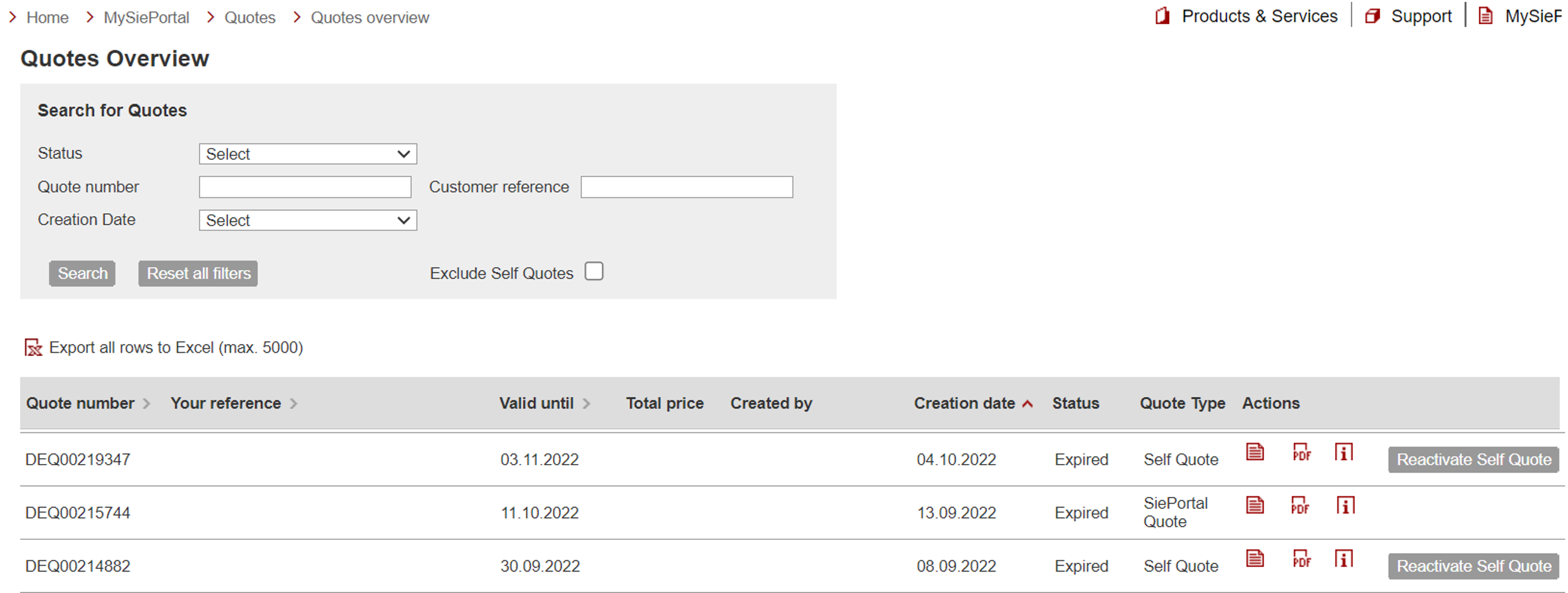
Quotes overviewTo call up the quotes overview, click on "mySiePortal" -> “Quotes" -> “Quotes overview".
In the quotation overview, you can see an overview of all quotations provided for your company via SiePortal.
There are following types of quotation: • Self Quote: A quote that was created in SiePortal • Quote (SiePortal): This was provided to you by our sales department.
There are several options to choose from in the Actions column:
If the validity period has expired, you can reactivate a Self Quote.
|

 Call
up quote details with direct ordering option
Call
up quote details with direct ordering option Call
up quote details for quotes whose validity has expired or if you
do not have the right to order
Call
up quote details for quotes whose validity has expired or if you
do not have the right to order The
quote can be downloaded as a PDF file
The
quote can be downloaded as a PDF file Display
information regarding the creation of the quote
Display
information regarding the creation of the quote If
attachments have been attached to the quotation, these can be
downloaded using the bracket symbol.
If
attachments have been attached to the quotation, these can be
downloaded using the bracket symbol.